Proxy setup
Some ad blockers and company firewalls block requests to api.rupt.dev. When that happens the SDK can't load and your users get stuck. The fix is to serve Rupt from a domain you own.
1. Add the domain
Open Settings > Domains in the dashboard and add a hostname, for example signals.example.com. Use a subdomain of the site you're protecting: that's the one thing a blocklist is least likely to have.
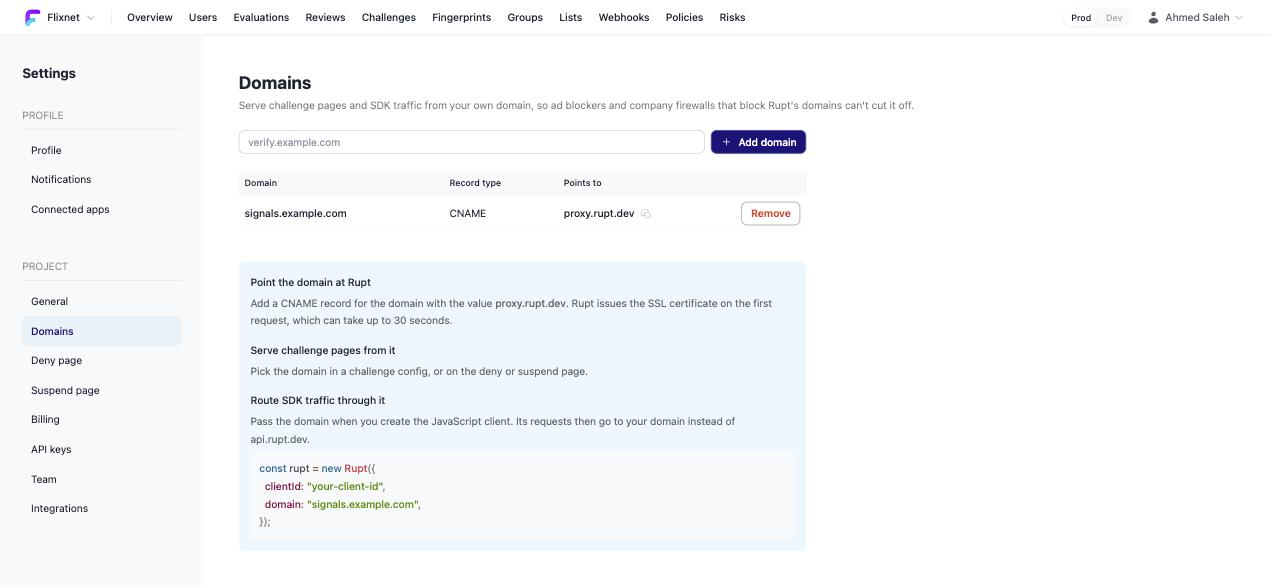
2. Point it at Rupt
Add a CNAME record at your DNS provider:
| Type | Name | Value |
|---|---|---|
| CNAME | signals | proxy.rupt.dev |
Rupt issues the SSL certificate on the first request, which can take up to 30 seconds.
3. Route the SDK through it
Pass the domain when you create the client:
const rupt = new Rupt({
  clientId: "your-client-id",
  domain: "signals.example.com",
});
Every request the SDK makes now goes to your domain instead of api.rupt.dev. Nothing else changes.
Challenge pages
If you want your challenge pages on your own domain too, add a second domain the same way, for example verify.example.com, then pick it in the challenge config as the domain to use. Keep it separate from the signals domain: users see the challenge domain in the address bar, and the signals one should never show up anywhere.
Limits
A filter that follows the CNAME and blocks proxy.rupt.dev still blocks it. And you can't remove a domain while a challenge config or the deny or suspend page still uses it, so switch those first.
- Need help? Contact support.
- Want to see Rupt in action? Request a demo.
- Questions? Talk to sales.
- Check out our changelog.
- Check our status page.
- LLM? Read llms.txt.